What the numbers mean
A few words first:
- A move is a change from one due date to another. Giving a work item its first due date isn’t a move, and neither is clearing it.
- A first due date is counted on its own, never as a move.
- A Correction is a change someone marked as a wrong date, not a real move. It’s left out of every number on the page.
- Work items don’t include epics.
- Every day and time is in your own time zone and date format.
Summary
Section titled “Summary”Three columns: Open (planned today), Done (finished) and All.
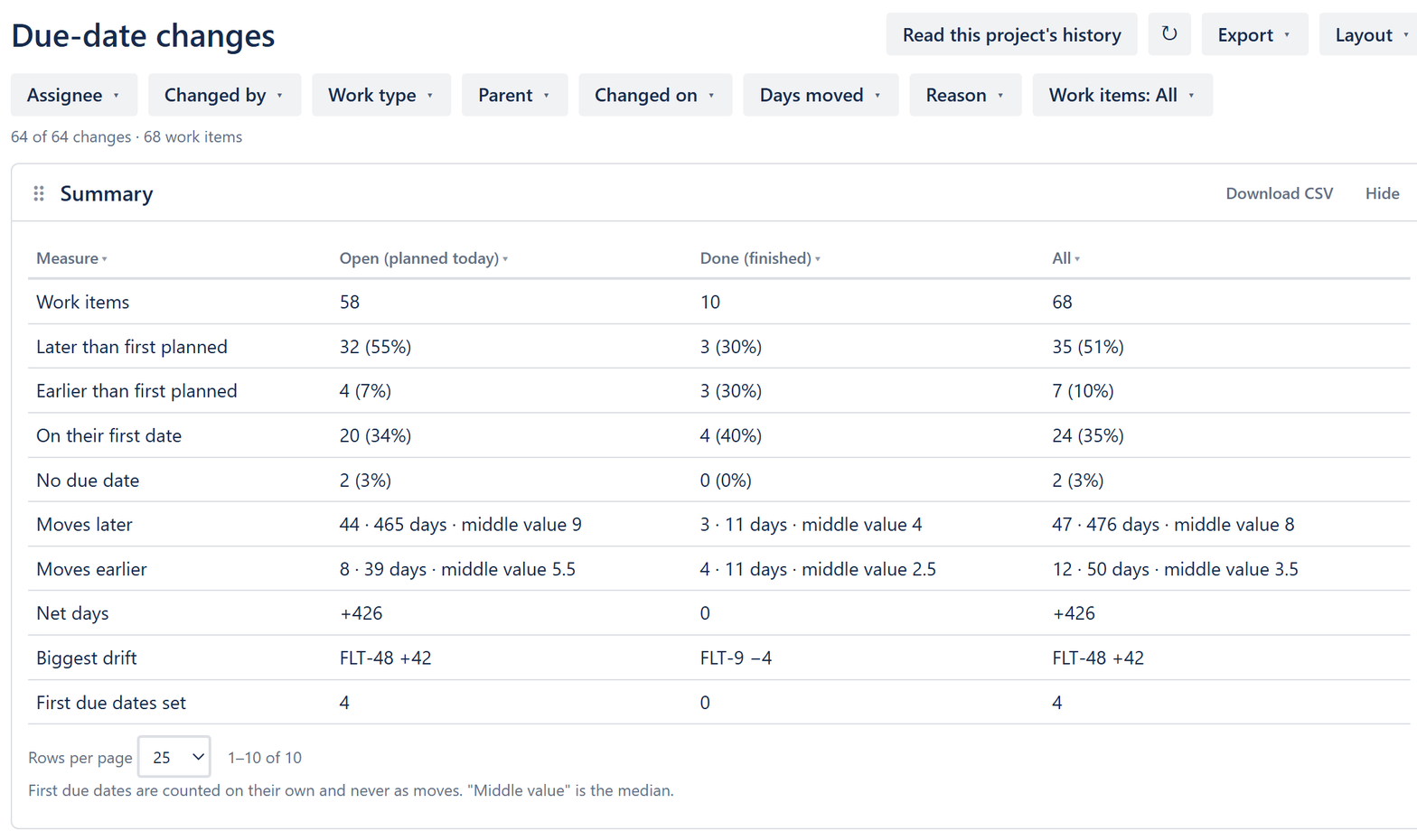
| Row | What it counts |
|---|---|
| Work items | Work items in the project, or touched by the filtered changes. |
| Later than first planned | Work items whose due date today is later than the first due date they ever had. |
| Earlier than first planned | The same, earlier. |
| On their first date | Work items whose due date today is the first one they had. |
| No due date | Work items with no due date. |
| Moves later | How many moves went later, the days they added and the middle value (the median). |
| Moves earlier | The same for moves earlier. |
| Net days | Days added minus days taken off. |
| Biggest drift | The work item furthest from its first due date. |
| First due dates set | How many work items got their first due date. |
The other blocks
Section titled “The other blocks”- Late now: open work items past their due date, most days late first.
- Trend: the changes per day, week or month. Choose what to count under Count, and split it by person, assignee, epic or work type under Split by.
- Why dates moved: moves by reason type, with the days they added and took off. No reason given counts the moves nobody has explained.
- Changes with no reason: the project’s to-do list. See Fill in missing reasons.
- All due-date changes: every change, one per row. See Get your first report.
- Group: work items grouped by Epic, Work type, Assignee, Who changed it or Reason type. Select a group to see its work items and where each ended up.
- Most moved work items: work items moved at least the number of times you set under Moved at least.
- People: moves per person, counted by Who changed it or by Assignee at the time. Of which for someone else counts moves on work assigned to somebody else.
A move is Last-minute when it was made within 2 days of the old due date.
Arrange the page
Section titled “Arrange the page”Drag a block by its ⠿ handle to move it. Select Hide to take it off the page, and Layout to bring it back or to Reset the page. Slipwatch keeps your layout for you; it doesn’t change anyone else’s.
Next: Share the report
© 2026 Morriblaze Ltd · Privacy policy