When Slipwatch asks you for a reason
When you change a due date in a project that uses Ask, a box opens in the middle of the screen a moment later. It opens on whichever Jira page you’re on: the work item, the board or the timeline.
-
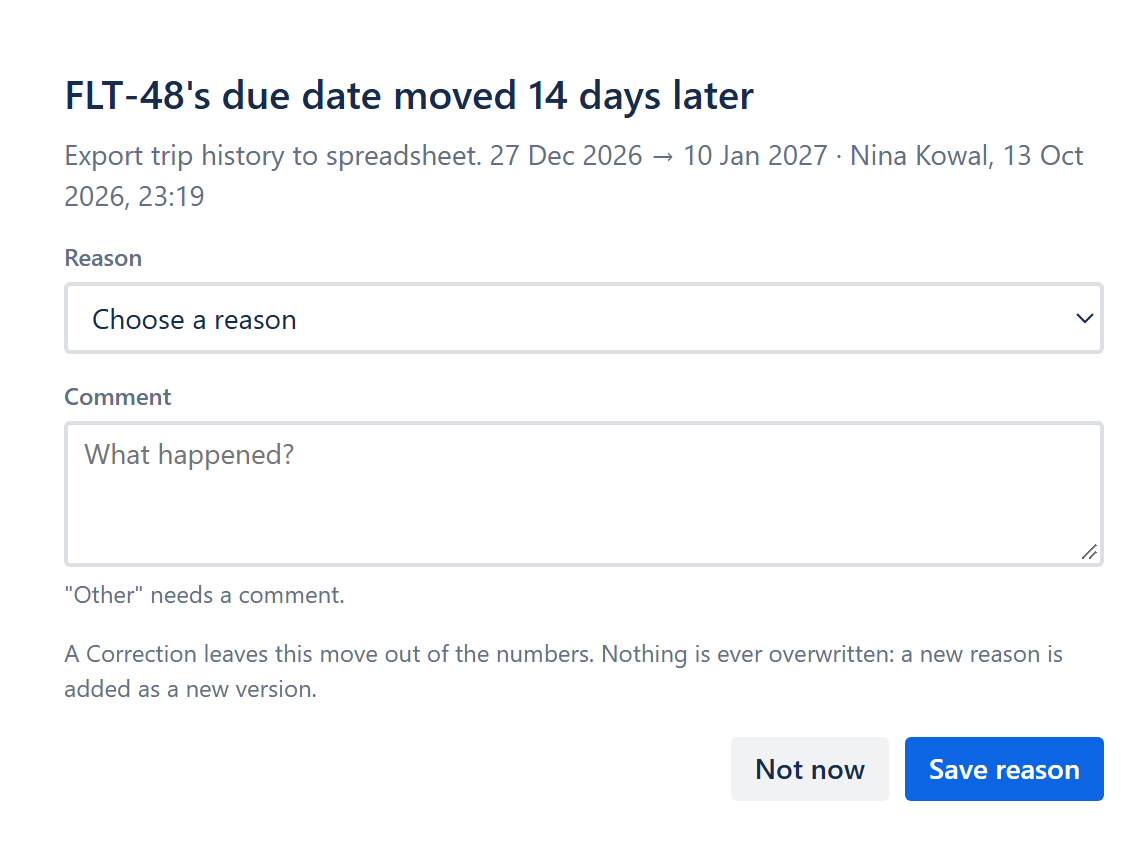
Read the title. It says which work item moved and by how much, for example FLT-12’s due date moved 7 days later. Under it are the old and new dates, who changed the date and when.
-
Under Reason, choose the reason that fits. Reasons are grouped by type, such as Internal, Dependency and External.
Choose Correction if the date was simply wrong and nothing really moved. Slipwatch leaves corrections out of every number in the report.
-
Add a few words under Comment if they help. A comment is optional, unless your project requires one or you chose Other.
-
Select Save reason. The box says Reason saved.
Not the right moment? Select Not now. The change waits in the work item’s Slipwatch panel and in the report’s Changes with no reason, so you can add the reason later. See Fill in missing reasons.
Good to know: a reason is never overwritten. If you give a new one later, the box keeps the old one underneath, under Earlier reason.
Next: Fill in missing reasons
© 2026 Morriblaze Ltd · Privacy policy