Choose which projects Slipwatch covers
Before you begin: only Jira admins can change Slipwatch’s settings. Slipwatch watches every project from the day it’s installed, so you only need this page to switch a project off, or back on.
Each project has its own Slipwatch settings.
Switch a project off
Section titled “Switch a project off”-
In the project, go to Space settings > Apps > Slipwatch.
-
Under Watch this project, turn the switch off.

-
Choose what happens to what Slipwatch has recorded:
- Switch off and keep keeps every change and reason. We recommend it.
- Switch off and delete deletes every change and every reason recorded for the project. This can’t be undone, so you type delete first.
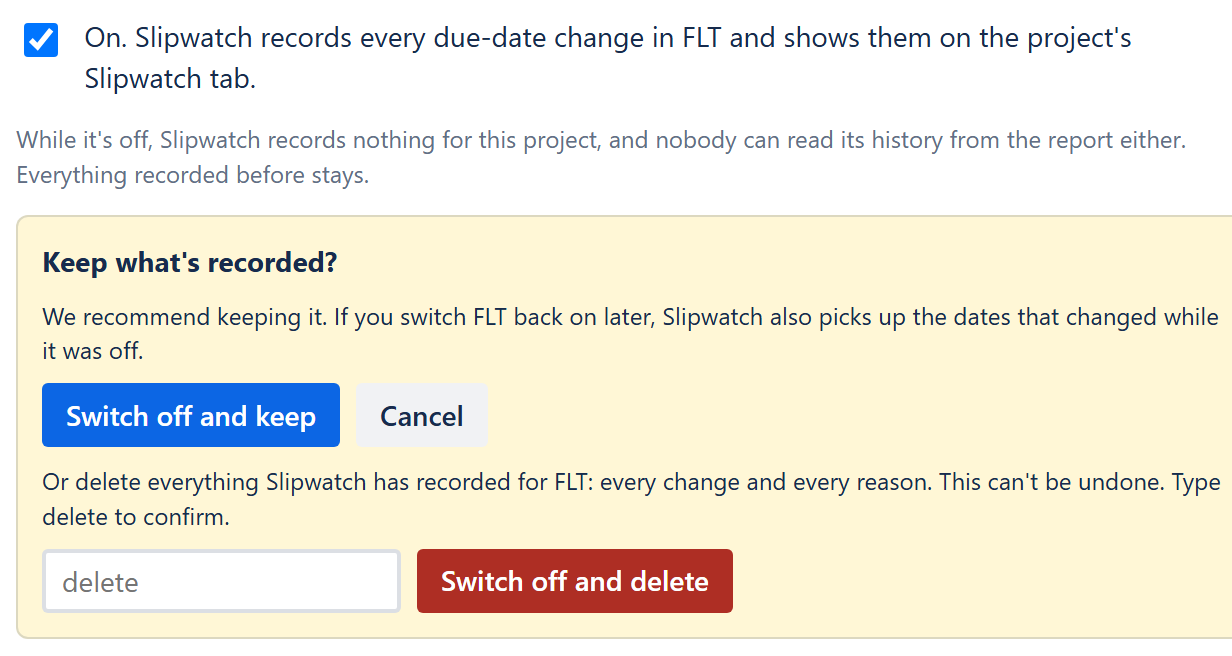
While a project is off, Slipwatch records nothing for it, and nobody can read its history from the report. The report still shows what was recorded before.
Switch it back on
Section titled “Switch it back on”Turn Watch this project back on. Slipwatch reads the project’s history again, which also picks up the dates that changed while it was off. Nothing is counted twice.
Next: Turn on Ask
© 2026 Morriblaze Ltd · Privacy policy